
TAShelix Solutions
Configurable solutions for regulated operations
Each TAShelix solution runs on the same platform and against your existing systems of record, so teams adopt what they need without adding another disconnected tool.
TAShelix Solutions
Configurable solutions for regulated operations
Each TAShelix solution runs on the same platform and against your existing systems of record, so teams adopt what they need without adding another disconnected tool.
TAShelix Platform
Build, deploy and run operational applications on one configurable platform that works in real time over the systems you already run, on any device, online or offline.
Challenge
Teams often rely on rigid systems, custom development for every change and a separate build for each device.
TAShelix Solution
Build and run operational applications through governed configuration, working live over your existing systems of record.
Outcome
Faster delivery of new applications, one consistent experience on every device and no duplicate source of truth.
Integration
Reads from and writes to host systems in real time through SOAP and REST web services, files, shell commands, direct database access and EDMS connections, storing only minimal data of its own.

Build and change applications through configuration, not code
Work in real time over your existing systems of record
Deliver one application definition to every device, online or offline
TAShelix Platform
Build, deploy and run operational applications on one configurable platform that works in real time over the systems you already run, on any device, online or offline.
Challenge
Teams often rely on rigid systems, custom development for every change and a separate build for each device.
TAShelix Solution
Build and run operational applications through governed configuration, working live over your existing systems of record.
Outcome
Faster delivery of new applications, one consistent experience on every device and no duplicate source of truth.
Integration
Reads from and writes to host systems in real time through SOAP and REST web services, files, shell commands, direct database access and EDMS connections, storing only minimal data of its own.
Build and change applications through configuration, not code
Work in real time over your existing systems of record
Deliver one application definition to every device, online or offline
TAShelix Platform
Build, deploy and run operational applications on one configurable platform that works in real time over the systems you already run, on any device, online or offline.
Challenge
Teams often rely on rigid systems, custom development for every change and a separate build for each device.
TAShelix Solution
Build and run operational applications through governed configuration, working live over your existing systems of record.
Outcome
Faster delivery of new applications, one consistent experience on every device and no duplicate source of truth.
Integration
Reads from and writes to host systems in real time through SOAP and REST web services, files, shell commands, direct database access and EDMS connections, storing only minimal data of its own.
Build and change applications through configuration, not code
Work in real time over your existing systems of record
Deliver one application definition to every device, online or offline
Dynamic Procedures
Author, approve and execute interactive procedures across desktop and mobile, with guided steps, structured data capture and a complete execution record.
Challenge
Teams often rely on static procedure documents, manual updates and disconnected execution records.
TAShelix Solution
Digitise approved procedures with guided steps, required data capture, evidence collection and review controls.
Outcome
Improved procedure compliance, clearer execution visibility and stronger control over completed work.
Integration
Links procedures to work orders, documents and related enterprise records through configured EAM and document-system integrations, while preserving host security and access rules.


Guide users step-by-step through approved procedures
Capture required data, evidence and approvals in one place
Improve visibility across active and completed work
Dynamic Procedures
Author, approve and execute interactive procedures across desktop and mobile, with guided steps, structured data capture and a complete execution record.
Challenge
Teams often rely on static procedure documents, manual updates and disconnected execution records.
TAShelix Solution
Digitise approved procedures with guided steps, required data capture, evidence collection and review controls.
Outcome
Improved procedure compliance, clearer execution visibility and stronger control over completed work.
Integration
Links procedures to work orders, documents and related enterprise records through configured EAM and document-system integrations, while preserving host security and access rules.
Guide users step-by-step through approved procedures
Capture required data, evidence and approvals in one place
Improve visibility across active and completed work
Dynamic Procedures
Author, approve and execute interactive procedures across desktop and mobile, with guided steps, structured data capture and a complete execution record.
Challenge
Teams often rely on static procedure documents, manual updates and disconnected execution records.
TAShelix Solution
Digitise approved procedures with guided steps, required data capture, evidence collection and review controls.
Outcome
Improved procedure compliance, clearer execution visibility and stronger control over completed work.
Integration
Links procedures to work orders, documents and related enterprise records through configured EAM and document-system integrations, while preserving host security and access rules.
Guide users step-by-step through approved procedures
Capture required data, evidence and approvals in one place
Improve visibility across active and completed work
Mobile Warehouse
Digitize receiving, movement, counting and inventory transactions at the point of work, with mobile workflows connected to the enterprise system of record.
Challenge
Paper forms, desktop-only systems and disconnected scanning tools create delays between physical activity and the inventory record.
TAShelix Solution
Give warehouse and field teams mobile access to search, scan, update and complete inventory workflows in real time.
Outcome
Teams can improve inventory visibility, reduce manual handling and support faster material movement across operations.
Integration
Reads from and writes to configured EAM and ERP systems through web services, extending existing warehouse processes and devices without replacing the system of record.


Search, scan and update inventory from mobile
Reduce manual handling between warehouse and field teams from mobile device
Improve material visibility across operational workflows
Mobile Warehouse
Digitize receiving, movement, counting and inventory transactions at the point of work, with mobile workflows connected to the enterprise system of record.
Challenge
Paper forms, desktop-only systems and disconnected scanning tools create delays between physical activity and the inventory record.
TAShelix Solution
Give warehouse and field teams mobile access to search, scan, update and complete inventory workflows in real time.
Outcome
Teams can improve inventory visibility, reduce manual handling and support faster material movement across operations.
Integration
Reads from and writes to configured EAM and ERP systems through web services, extending existing warehouse processes and devices without replacing the system of record.
Search, scan and update inventory from mobile
Reduce manual handling between warehouse and field teams from mobile device
Improve material visibility across operational workflows
Mobile Warehouse
Digitize receiving, movement, counting and inventory transactions at the point of work, with mobile workflows connected to the enterprise system of record.
Challenge
Paper forms, desktop-only systems and disconnected scanning tools create delays between physical activity and the inventory record.
TAShelix Solution
Give warehouse and field teams mobile access to search, scan, update and complete inventory workflows in real time.
Outcome
Teams can improve inventory visibility, reduce manual handling and support faster material movement across operations.
Integration
Reads from and writes to configured EAM and ERP systems through web services, extending existing warehouse processes and devices without replacing the system of record.
Search, scan and update inventory from mobile
Reduce manual handling between warehouse and field teams from mobile device
Improve material visibility across operational workflows
Digital Work Packages
Connect field work, approvals and progress tracking in one digital work package workflow.
Challenge
Work execution can be delayed when packages, approvals, updates and progress tracking are managed across disconnected tools.
TAShelix Solution
Connect work packages, approvals, field updates and execution records in one governed digital workflow.
Outcome
Improved control from planning through completion, with clearer status visibility and fewer manual handoffs.
Integration
Reads from and writes to configured enterprise asset and document systems, preserving host security, qualifications, scheduling and work controls while returning completed quality records to the customer repository.


Connect work packages, approvals and field execution
Give teams one place to capture progress and updates
Improve control from planning through completion
Digital Work Packages
Connect field work, approvals and progress tracking in one digital work package workflow.
Challenge
Work execution can be delayed when packages, approvals, updates and progress tracking are managed across disconnected tools.
TAShelix Solution
Connect work packages, approvals, field updates and execution records in one governed digital workflow.
Outcome
Improved control from planning through completion, with clearer status visibility and fewer manual handoffs.
Integration
Reads from and writes to configured enterprise asset and document systems, preserving host security, qualifications, scheduling and work controls while returning completed quality records to the customer repository.
Connect work packages, approvals and field execution
Give teams one place to capture progress and updates
Improve control from planning through completion
Digital Work Packages
Connect field work, approvals and progress tracking in one digital work package workflow.
Challenge
Work execution can be delayed when packages, approvals, updates and progress tracking are managed across disconnected tools.
TAShelix Solution
Connect work packages, approvals, field updates and execution records in one governed digital workflow.
Outcome
Improved control from planning through completion, with clearer status visibility and fewer manual handoffs.
Integration
Reads from and writes to configured enterprise asset and document systems, preserving host security, qualifications, scheduling and work controls while returning completed quality records to the customer repository.
Connect work packages, approvals and field execution
Give teams one place to capture progress and updates
Improve control from planning through completion
Corrective Action Program (CAP)
Support corrective action workflows with clearer tracking, visibility and operational follow-through.
Challenge
Corrective action processes can become difficult to manage when issue capture, evidence, ownership and review steps are spread across systems.
TAShelix Solution
Centralise issue capture, corrective actions, evidence, assignments and review steps in one controlled workflow.
Outcome
Teams gain clearer visibility of open actions, responsibilities and resolution progress across the corrective action lifecycle.
Integration
Creates and updates linked corrective action records in configured EAM systems, connecting field evidence, asset information, assignments, review activity and trending in one digital thread.
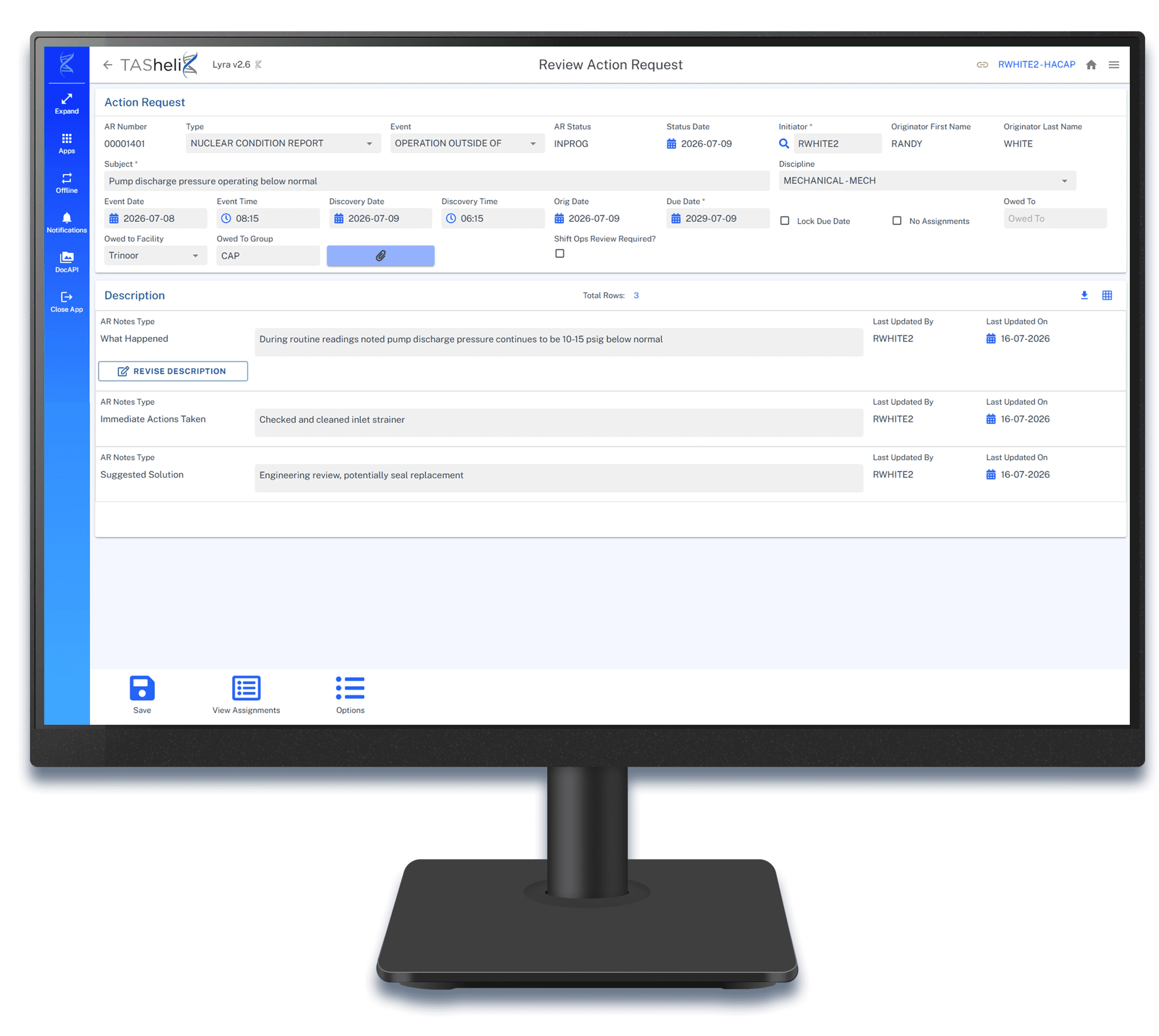

Capture issues and supporting evidence in one workflow
Assign actions, owners and review steps clearly
Track corrective action progress through to resolution
Corrective Action Program (CAP)
Support corrective action workflows with clearer tracking, visibility and operational follow-through.
Challenge
Corrective action processes can become difficult to manage when issue capture, evidence, ownership and review steps are spread across systems.
TAShelix Solution
Centralise issue capture, corrective actions, evidence, assignments and review steps in one controlled workflow.
Outcome
Teams gain clearer visibility of open actions, responsibilities and resolution progress across the corrective action lifecycle.
Integration
Creates and updates linked corrective action records in configured EAM systems, connecting field evidence, asset information, assignments, review activity and trending in one digital thread.
Capture issues and supporting evidence in one workflow
Assign actions, owners and review steps clearly
Track corrective action progress through to resolution
Corrective Action Program (CAP)
Support corrective action workflows with clearer tracking, visibility and operational follow-through.
Challenge
Corrective action processes can become difficult to manage when issue capture, evidence, ownership and review steps are spread across systems.
TAShelix Solution
Centralise issue capture, corrective actions, evidence, assignments and review steps in one controlled workflow.
Outcome
Teams gain clearer visibility of open actions, responsibilities and resolution progress across the corrective action lifecycle.
Integration
Creates and updates linked corrective action records in configured EAM systems, connecting field evidence, asset information, assignments, review activity and trending in one digital thread.
Capture issues and supporting evidence in one workflow
Assign actions, owners and review steps clearly
Track corrective action progress through to resolution
Time Reporting
Capture, submit and approve timesheets across mobile devices and desktop, with simple guided entry, visual reporting and direct sync to your time recording system such as Hitachi Asset Suite.
Challenge
Teams often rely on paper timesheets, manual transcription, dated EAM/ERP and disconnected payroll and accounting systems.
TAShelix Solution
Digitize time capture with simple mobile entry, structured job coding, automated approval routing and direct sync to time recording systems such as Hitachi Asset Suite.
Outcome
Faster, more accurate payroll processing, clearer labor visibility and stronger control over hours, from individual employees to large team timesheets.
Integration
Faster payroll processing, connects directly to the time recording system via web services.


Log and submit hours from any device
Captured time is entered directly into the time reporting system
Improve visibility across individual and large team timesheets
Time Reporting
Capture, submit and approve timesheets across mobile devices and desktop, with simple guided entry, visual reporting and direct sync to your time recording system such as Hitachi Asset Suite.
Challenge
Teams often rely on paper timesheets, manual transcription, dated EAM/ERP and disconnected payroll and accounting systems.
TAShelix Solution
Digitize time capture with simple mobile entry, structured job coding, automated approval routing and direct sync to time recording systems such as Hitachi Asset Suite.
Outcome
Faster, more accurate payroll processing, clearer labor visibility and stronger control over hours, from individual employees to large team timesheets.
Integration
Faster payroll processing, connects directly to the time recording system via web services.
Log and submit hours from any device
Captured time is entered directly into the time reporting system
Improve visibility across individual and large team timesheets
Time Reporting
Capture, submit and approve timesheets across mobile devices and desktop, with simple guided entry, visual reporting and direct sync to your time recording system such as Hitachi Asset Suite.
Challenge
Teams often rely on paper timesheets, manual transcription, dated EAM/ERP and disconnected payroll and accounting systems.
TAShelix Solution
Digitize time capture with simple mobile entry, structured job coding, automated approval routing and direct sync to time recording systems such as Hitachi Asset Suite.
Outcome
Faster, more accurate payroll processing, clearer labor visibility and stronger control over hours, from individual employees to large team timesheets.
Integration
Faster payroll processing, connects directly to the time recording system via web services.
Log and submit hours from any device
Captured time is entered directly into the time reporting system
Improve visibility across individual and large team timesheets
DocAPI
Manage documents and attachments directly inside TAShelix. Attach, view, markup and control access to any file type, on desktop and mobile, without leaving the screen.
Challenge
Teams manage documents in a system disconnected from work, creating context-switching, manual lookups and inconsistent security across attachments.
TAShelix Solution
DocAPI bridges to your existing EDMS or storage system, so users attach, view, markup and manage documents from TAShelix screens under one consistent security model.
Outcome
A consistent, controlled and auditable document experience across desktop and mobile, built on the document infrastructure you already own.
Integration
A consistent, controlled and auditable document experience tied directly to TAShelix as it relates to work orders, equipment, controlled documents, warehouse materials, procedures and more.

Attach, view, markup and manage documents directly from the TAShelix screens
Connect to your EDMS, SharePoint, S3, SAN or custom storage without replacing it
Secure access and configurable audit trail provide per-class controls and compliance
DocAPI
Manage documents and attachments directly inside TAShelix. Attach, view, markup and control access to any file type, on desktop and mobile, without leaving the screen.
Challenge
Teams manage documents in a system disconnected from work, creating context-switching, manual lookups and inconsistent security across attachments.
TAShelix Solution
DocAPI bridges to your existing EDMS or storage system, so users attach, view, markup and manage documents from TAShelix screens under one consistent security model.
Outcome
A consistent, controlled and auditable document experience across desktop and mobile, built on the document infrastructure you already own.
Integration
A consistent, controlled and auditable document experience tied directly to TAShelix as it relates to work orders, equipment, controlled documents, warehouse materials, procedures and more.
Attach, view, markup and manage documents directly from the TAShelix screens
Connect to your EDMS, SharePoint, S3, SAN or custom storage without replacing it
Secure access and configurable audit trail provide per-class controls and compliance
DocAPI
Manage documents and attachments directly inside TAShelix. Attach, view, markup and control access to any file type, on desktop and mobile, without leaving the screen.
Challenge
Teams manage documents in a system disconnected from work, creating context-switching, manual lookups and inconsistent security across attachments.
TAShelix Solution
DocAPI bridges to your existing EDMS or storage system, so users attach, view, markup and manage documents from TAShelix screens under one consistent security model.
Outcome
A consistent, controlled and auditable document experience across desktop and mobile, built on the document infrastructure you already own.
Integration
A consistent, controlled and auditable document experience tied directly to TAShelix as it relates to work orders, equipment, controlled documents, warehouse materials, procedures and more.
Attach, view, markup and manage documents directly from the TAShelix screens
Connect to your EDMS, SharePoint, S3, SAN or custom storage without replacing it
Secure access and configurable audit trail provide per-class controls and compliance
FAQs
Answers to common questions about implementing, adopting and supporting TAShelix in regulated, asset-intensive operations.
Q1. How does TAShelix integrate with existing systems?
TAShelix connects to the systems you already run through APIs, files, direct database access and enterprise content platforms. It reads and writes in real time and stores only minimal data of its own, so there is no duplicate source of truth to reconcile and no need to replace the systems already in place.
Q2. How is compliance and auditability managed?
Governance is built into the platform. Role-based access, approvals, version control and controlled releases are managed centrally, and completed work, changes and approvals are traceable for reporting and audit. This lets teams digitise complex work while keeping the operational control that regulated environments require.
Q3. How long does implementation typically take?
Implementation timeframes depend on the workflows involved and the systems being integrated. Because applications are configured rather than custom-built, changes are typically delivered faster and at lower risk than traditional development. We scope timing with your operational and IT teams at the start of an engagement.
Q4. What does an implementation involve?
We work with your operational and IT teams to configure workflows, forms, rules and approvals around how you already work, then connect TAShelix to your enterprise systems. The focus is on fitting the platform to your operations rather than changing your operations to suit the platform.
Q5. What training and onboarding do you provide?
We provide structured onboarding for both operational and administrative users, with role-based guidance so teams can apply TAShelix to their actual tasks. The aim is confident adoption across field, operational and admin teams from the point of go-live.
Q6. Can TAShelix be configured for our specific workflows?
Yes. TAShelix is configuration-driven, so workflows, forms and processes are built to match your operational requirements and adjusted as those requirements change, without custom development for every update.